
Local visibility
See where they’re missing.
Know where to work next.
A single ranking cannot show you the whole market. Track visibility across the map, research nearby competitors, and bring the client’s services and locations into the website plan.
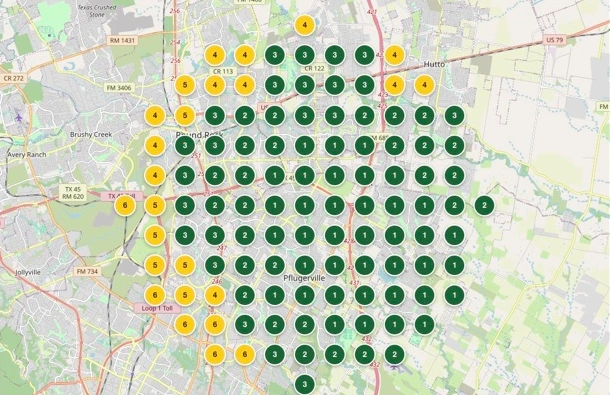
The map and the work belong together.
Understand the local market, plan around the business, and keep reviewing visibility as you deliver.
Research the local competition.
Explore competing Google Business Profiles, their categories, and their services. Build a clearer picture of how businesses present themselves in the market.
Plan the business profile.
Review the client’s categories and services, then use the confirmed plan to inform website work. Keep the agency’s decisions visible rather than buried in a separate brief.
Track across the map.
Choose keywords, a grid, and a schedule. Review saved runs, average positions, and top-three coverage. Compare snapshots to understand where visibility has changed.
Work location by location.
Manage multiple GBP locations within a client and select the relevant location in supported workflows. Review reputation and citation consistency alongside the broader local picture.
From the business profile to its website.
- 01
Research the market
Review competitors and confirm the client’s business categories and services.
- 02
Build from that foundation
Use the confirmed profile and services to inform the website structure and content.
- 03
Follow local visibility
Run scheduled keyword grids and compare saved results location by location.
The map shown is a real product capture, with client-identifying information excluded. It illustrates one saved scan, not an expected result for another business.
Can this replace a separate local rank tracker?
Elara includes keyword grids, scheduled scans, saved results and location-specific tracking. Agencies using BrightLocal or Local Dominator for that work can manage it alongside their websites and content in Elara. Other products’ specialist features and data coverage may differ.
Can one client have multiple business locations?
Yes. Elara supports multiple Google Business Profile locations within a client, with location selection in relevant planning, tracking and publishing workflows.
Does Elara make profile changes automatically?
Connecting GBP, planning changes and applying them are separate steps. Review the changes and the destination profile before submitting updates.
Built around your agency
Give your agency room for more clients.
Give your next client a connected home for their website, SEO, content and social. Give yourself the capacity to take on the one after that.